
Krit Th.
20+ yrs in programming professional markets, FMCG researchers, system analyst, university lecturers, broadcasting expert, and so on.
Dim iTotal As Double = 0
Dim intQty As Integer
Dim itemName As String| ส่วนประกอบ | ความหมาย |
|---|---|
| Dim | คำสั่งประกาศตัวแปร |
| iTotal | ชื่อตัวแปร |
| Double | ชนิดข้อมูลตัวเลขทศนิยม |
| 0 | ค่าเริ่มต้น |
| คำสั่ง | ตัวอย่างจากโค้ด | คำอธิบายสั้น ๆ |
|---|---|---|
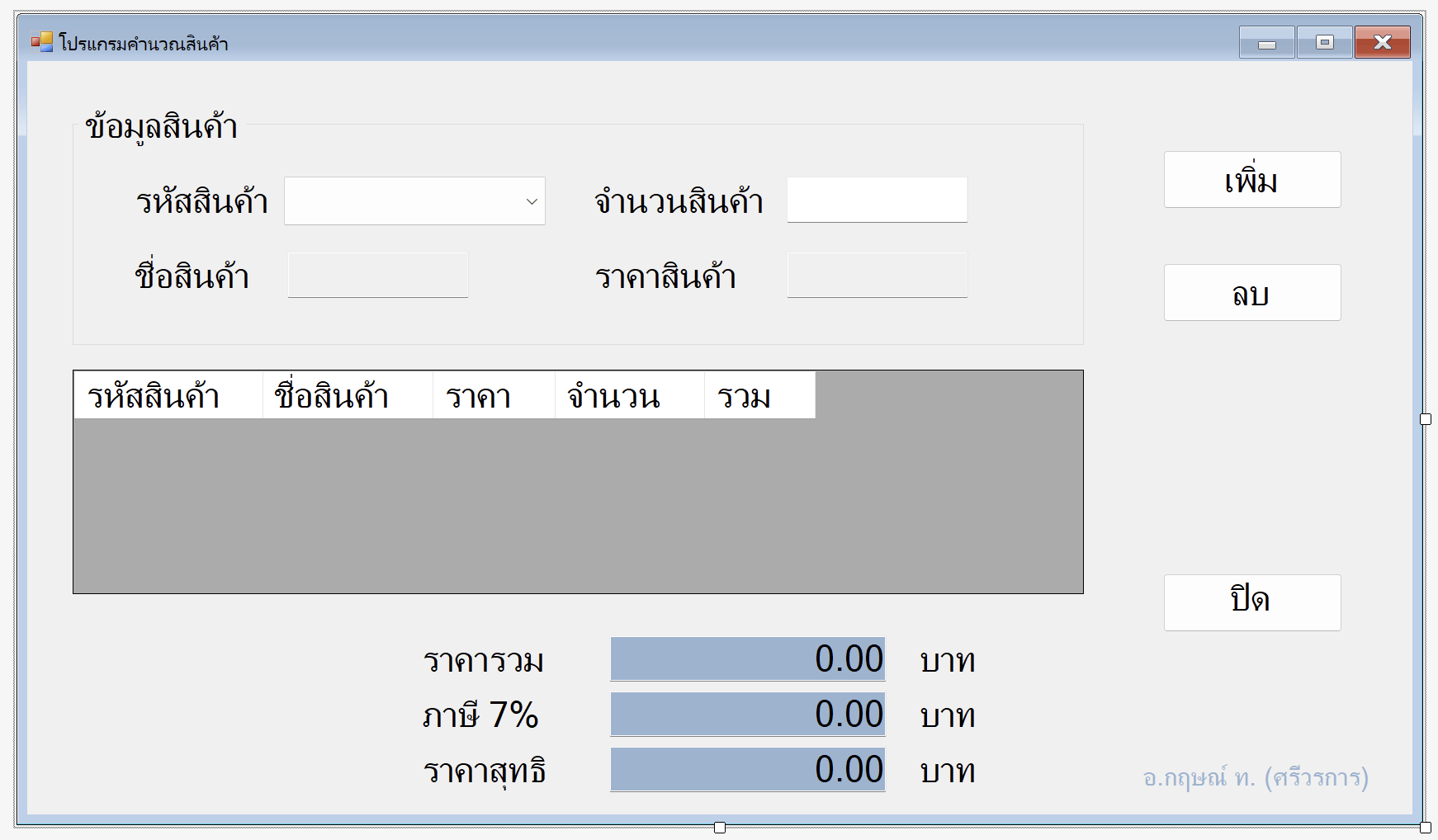
| .Text | txtQty.Text | ใช้อ่านหรือกำหนดข้อความใน TextBox |
| = | txtItemTitle.Text = "ดินสอ" | ใช้กำหนดค่าให้ TextBox |
| .Text = "" | txtQty.Text = "" | ใช้ล้างข้อความใน TextBox |
| Format() | txtGrandTotal.Text = Format(iTotal, "#,###,##0.00") | จัดรูปแบบตัวเลขก่อนนำไปแสดงใน TextBox |
| IsNumeric() | IsNumeric(txtQty.Text) | ตรวจสอบว่าข้อความใน TextBox เป็นตัวเลขหรือไม่ |
| .Contains() | intQty.Contains(".") | ตรวจสอบว่าข้อความมีอักขระที่กำหนดหรือไม่ |
| CDbl() | CDbl(txtItemPrice.Text) | แปลงข้อความใน TextBox ให้เป็นตัวเลขชนิด Double |
| คำสั่ง / Property | ตัวอย่างจากโค้ด | คำอธิบายสั้น ๆ |
|---|---|---|
| .SelectedIndex | cbItem.SelectedIndex | ดูว่าผู้ใช้เลือกตัวเลือกอันดับที่เท่าไร |
| -1 | cbItem.SelectedIndex = -1 | หมายถึงยังไม่ได้เลือกข้อมูล |
| = 0, 1, 2... | cbItem.SelectedIndex = 0 | ใช้ตรวจว่าผู้ใช้เลือกตัวเลือกใด |
| .SelectedIndexChanged | cbItem.SelectedIndexChanged | เหตุการณ์ที่ทำงานเมื่อผู้ใช้เปลี่ยนรายการที่เลือก |
| .Text | cbItem.Text | อ่านข้อความที่แสดงอยู่ใน ComboBox |
| .Items.Add() | cbItem.Items.Add("001") | เพิ่มรายการเข้า ComboBox |
| .Items.Clear() | cbItem.Items.Clear() | ล้างรายการทั้งหมดใน ComboBox |
| คำสั่ง / Property | ตัวอย่างจากโค้ด | คำอธิบายสั้น ๆ |
|---|---|---|
| .Rows | dtMain.Rows | ใช้เข้าถึงแถวทั้งหมดในตาราง |
| .Rows.Add() | dtMain.Rows.Add(...) | เพิ่มข้อมูล 1 แถวลงในตาราง |
| .Rows.Count | dtMain.Rows.Count | นับจำนวนแถวในตาราง |
| .CurrentCell.RowIndex | dtMain.CurrentCell.RowIndex | ดูว่าเซลล์ที่เลือกอยู่แถวที่เท่าไร |
| .CurrentCell.ColumnIndex | dtMain.CurrentCell.ColumnIndex | ดูว่าเซลล์ที่เลือกอยู่คอลัมน์ที่เท่าไร |
| .Cells() | row.Cells("Column5").Value | อ่านค่าจากเซลล์ในคอลัมน์ที่กำหนด |
| .Value | Cells("Column5").Value | อ่านค่าที่อยู่ในเซลล์ |
| .Rows.RemoveAt() | dtMain.Rows.RemoveAt(coorX) | ลบแถวตามหมายเลขแถว |
| For Each ... In .Rows | For Each row ... In dtMain.Rows | วนอ่านข้อมูลทุกแถวในตาราง |
If เงื่อนไข Then
    'คำสั่งกรณีเป็นจริง
Else
    'คำสั่งกรณีเป็นเท็จ
End If
If cbItem.SelectedIndex = 0 Then
txtItemTitle.Text = "ดินสอ"
ElseIf cbItem.SelectedIndex = 1 Then
txtItemTitle.Text = "ยางลบ"
ElseIf cbItem.SelectedIndex = 2 Then
txtItemTitle.Text = "ปากกา"
End IfFor Each ตัวแปร In กลุ่มข้อมูล
'คำสั่ง
NextFor Each row As DataGridViewRow In dtMain.Rows
iTotal = iTotal + CDbl(row.Cells("Column5").Value)
Next| คำสั่ง / ส่วนประกอบ | ตัวอย่างจากโค้ด | คำอธิบายสั้น ๆ |
|---|---|---|
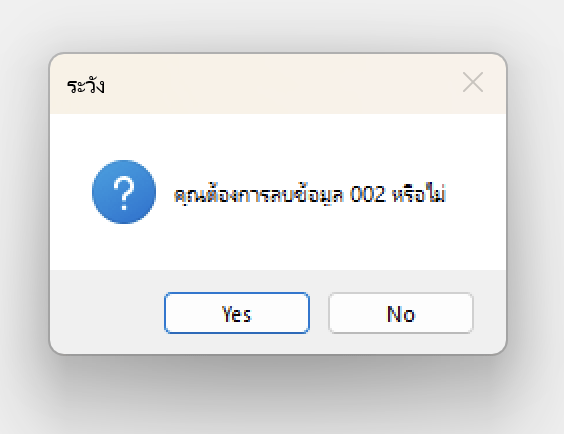
| MessageBox.Show() | MessageBox.Show("กรุณาเลือกรหัสสินค้า") | แสดงกล่องข้อความ |
| MessageBoxButtons.OK | MessageBoxButtons.OK | แสดงปุ่ม OK |
| MessageBoxButtons.YesNo | MessageBoxButtons.YesNo | แสดงปุ่ม Yes / No |
| MessageBoxIcon.Warning | MessageBoxIcon.Warning | แสดงไอคอนเตือน |
| MessageBoxIcon.Question | MessageBoxIcon.Question | แสดงไอคอนคำถาม |
| DialogResult | Dim result As DialogResult | ตัวแปรสำหรับรับผลว่าผู้ใช้กดปุ่มอะไร |
| DialogResult.Yes | If result = DialogResult.Yes Then | ตรวจว่าผู้ใช้กด Yes หรือไม่ |
Dim result As DialogResult

result = MessageBox.Show(
    "คุณต้องการลบข้อมูล 002 หรือไม่",
    "ระวัง",
    MessageBoxButtons.YesNo,
    MessageBoxIcon.Question)

'ตัวแปร result สามารถนำไปใช้งานต่อได้
'โดยจะมีค่าเป็น True (จริง) หรือ False (เท็จ)
'มักนำไปใช้งานร่วมกับ If ... End If ต่อ
© Aj. Krit Th.
https://www.kritth.com
By Krit Th.